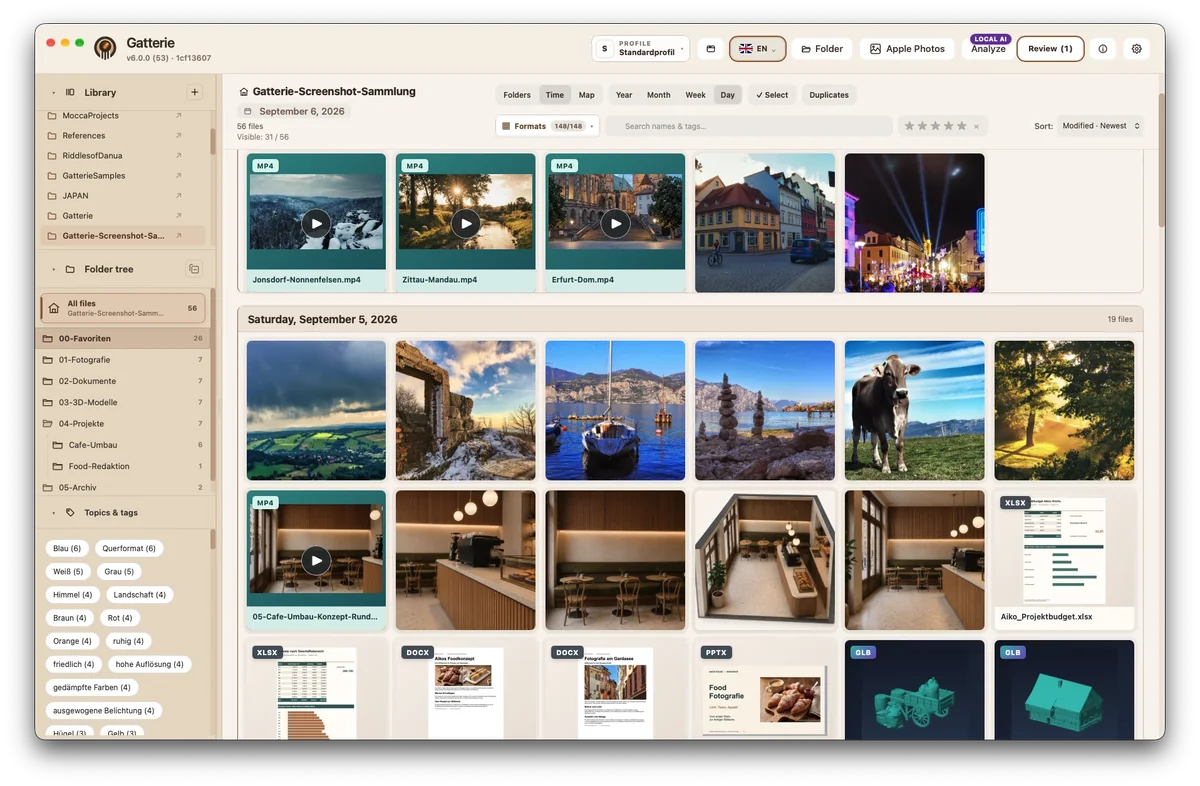
Is Gatterie an image organizer for Mac?
Not in the usual sense. An organizer often manages files itself, for example in a library or catalog. Gatterie doesn’t move, rename or delete your files. If you want to organize photos on your Mac, you create folders in Finder as usual. Gatterie then shows what’s in those folders and helps you find images again.
How Gatterie helps you organize
An overview of your folders
Gallery, folder tree or timeline: you see what’s in a folder – including videos, PDFs and 3D models.
Tags and stars
Add tags to images and rate them with stars. Filters combine both.
Search
Search covers file names and tags, so your shots are quickly back at hand.
Timeline and map
See photos by capture date; images with GPS data show where they were taken on a map.
Optional: local AI
Get tags and image descriptions suggested by an AI model on your Mac and review them before accepting. More about local AI
More than photos
Camera RAW, videos, PDFs and 3D models appear in the same view as your pictures.
Your folders stay as they are
Gatterie doesn’t move, rename or delete your files. No import, no catalog: it shows your folders as they are. By default, edited images are saved as a new copy; only an explicitly selected expert option can change the original, after a warning. Removing the app changes nothing in your folders.
When another app fits better
If you want an app to rename, sort or move your files into new folders by itself, Gatterie is not the right tool. Gatterie shows your files and helps you find them again; organizing the files stays with you.
Try it with your own folders
The free 14-day trial works with your own folders, with no registration, email address or payment details.
Trial as a DMG, no registration or payment details · Full version as a one-time purchase, no subscription, with Family Sharing · For Macs with Apple silicon (macOS 12 or later)